


Source: Announcement
This object represents a Chatter Group Announcement.
To create a new announcement, go to the Chatter tab, select (or create) a group:
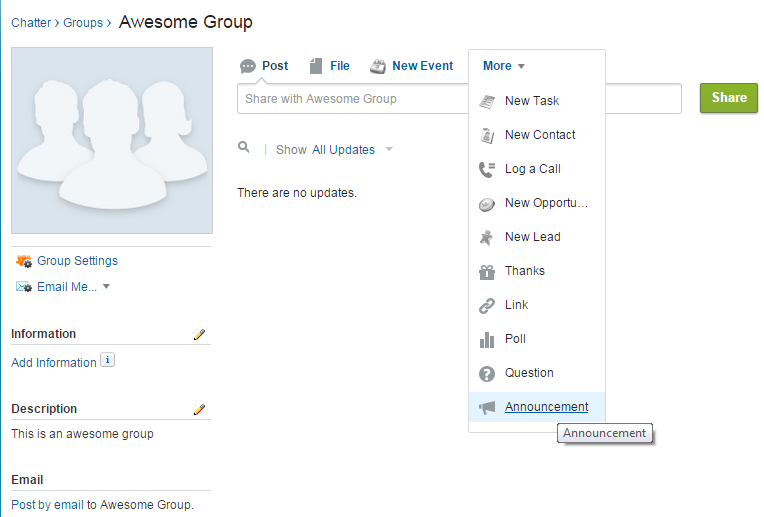
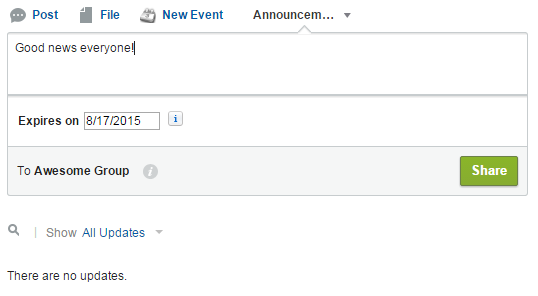
Click on More > Announcement and select the body of the announcement and an expiration date:
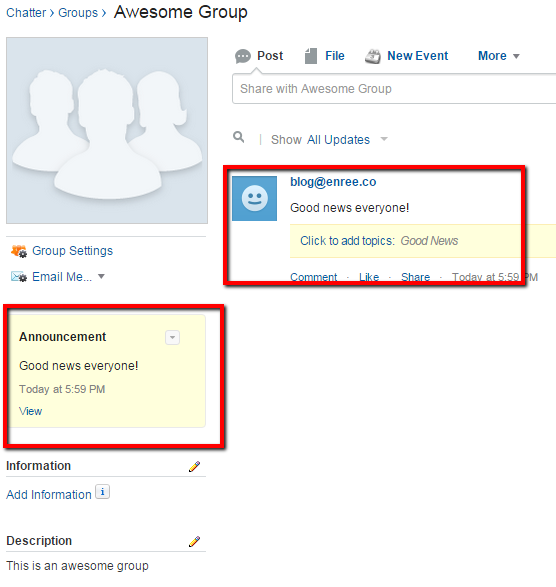
A section will compare on the Group's sidebar:
The Announcement object is a detail of the FeedItem object that specifies the Expiration Date of the feed. Given the following query:

To create the object programmatically follow these rules:
This object represents a Chatter Group Announcement.
To create a new announcement, go to the Chatter tab, select (or create) a group:
Click on More > Announcement and select the body of the announcement and an expiration date:
A section will compare on the Group's sidebar:
The Announcement object is a detail of the FeedItem object that specifies the Expiration Date of the feed. Given the following query:
select FeedItem.Body, ExpirationDate, Parent.Name from Announcement
To create the object programmatically follow these rules:
//query the Collaboration Grouop
CollaborationGroup group = [Select Id From CollaborationGroup Where Name = 'Awesome Group'];

//creates a feed item; type "AdvancedTextPost" is mandatory
FeedItem item = new FeedItem(Type='AdvancedTextPost', ParentId=group.Id, Body='This is an awesome announcement');
insert item;

//create the announcement
Announcement anc = new announcement(FeedItemId=item.Id, ExpirationDate=System.today().addDays(10));
insert anc;

//upate the group
group.AnnouncementId=anc.Id
update group;
Commenti
Posta un commento